

Finding Every File: Self-Hosting PrintStash for a Small Print Shop

The Digital Homestead · Home Lab
Building a private cloud on top of a structured deployment pipeline pays off in a specific, easy-to-undersell way: once ingress, TLS, DNS, storage, and secrets are all solved problems with a repeatable path to production, trying a new piece of software stops being a project. Evaluating it and putting it into production become the same day of work, instead of two efforts separated by weeks of infrastructure decisions.
I used exactly that to evaluate PrintStash, a self-hosted print-file library manager, and get it running in production for my Etsy shop. It never felt like a separate migration step because the pipeline that ran the evaluation is the same one that runs production. This post covers why I needed it, how it's wired into that pipeline, and where it still needs work.
The Need: Files Everywhere
Every 3D printing hobby ends up with the same bad folder: one 3MF, a tuned copy, a "final," a "final_v2," until you're spread across a Downloads folder, a NAS share, and a couple of cloud drives, and you can't say which copy you actually printed last time. That's tolerable for a hobby. It wasn't once it became a business. Everything in my Etsy shop is a design I made myself, and a shop needs an answer to one specific question: an order comes in, so where's the exact file that produces it, at the settings I already proved work?
Three things pushed me to solve it properly:
Scattered files. My own designs, and every tuned, re-sliced, revised version of them, lived in a handful of places with no shared structure.
Business needs. A hobby tolerates "I'll find it eventually." A shop needs one place that holds every design I sell, matches what's listed, and gets me from an order to a printable file fast.
Backups and ownership. The files are the durable asset here, not the printers. I wanted that library self-hosted, backed up on my terms, and not hostage to whichever cloud service happens to hold it this year.
Why PrintStash
PrintStash is a self-hosted library manager for 3MF and other print files. The honest option I considered first wasn't another tool, it was building this myself. A tagged file index with thumbnails and an upload flow isn't a hard problem to describe, and I could have put together a version of it as a weekend project.
I didn't, on purpose. Something close to what I needed already existed, and an almost-perfect solution someone else has already built and is actively maintaining beats a perfect one I'd have to build, debug, and keep working myself. That instinct, to reach for the tool that's already 90% there instead of custom-building the last 10%, is one I've had to relearn more than once in this lab. You don't have to build everything, you have to know which few things are worth building.
So I looked at the alternatives that already existed (other self-hosted libraries, the built-in libraries on the model sites, plain folders with better discipline) and PrintStash won on five points that all mattered for my setup.
It's 3MF-focused. The files I care about are tuned print projects, not just meshes. A tool that understands 3MF as a first-class format fits how I actually work.
It doesn't touch my printers or my LAN. This is the big one for anyone who's followed my zone-based firewall work. PrintStash does no printer control and has no SSDP or LAN-discovery requirement, so it never asks me to poke a hole in a segmented network. It's a library, not a bridge.
It deploys like a normal container app. Prebuilt images and a hardened production compose file upstream meant I was adapting a working deployment, not inventing one.
It supports S3-compatible storage for the file vault. That single feature shaped the entire storage design, and I'll come back to it.
It fits the shop. I didn't want a general-purpose file browser. I wanted an easy print solution for the Etsy side of things, built around a library of my own designs.
In practice, "fits the shop" comes down to four workflows I wanted from day one:
Order to file, fast. Find the right 3MF for an order in seconds. Versioned print profiles. One known-good file per product instead of a dozen "final" copies. A catalog I can trust. One source of truth for every design in the shop. Easy handoff. Family or helpers should be able to grab the right file without knowing my folder structure.
That's the goal, not a victory lap. I'll be straight about how much of it is proven in the verdict below.
The Storage Design: S3 for the Vault, NFS for the Rest
3MF files are big, and a print shop only gets more of them. I didn't want the library's growth tied to the disk on whichever host happened to run the container, or its durability tied to that host's health.
So the storage is split on purpose:
The model-file vault lives in S3-compatible object storage. It's a self-hosted RustFS instance on the same TrueNAS box that anchors the rest of the lab's storage. This is the part that grows, so it lives in the store built for growth.
Everything small and stateful lives on NFS. The SQLite database, thumbnails, the staging directory, and backups sit on the NAS-backed mount the other services already use.
Two details worth stealing if you do this:
The bucket has to exist first. PrintStash never creates buckets. It expects one to be waiting.
The credential is scoped to that one bucket. The app gets an IAM key limited to its own bucket, not the storage root key. It's the same instinct as the scoped-access post: if the app is ever compromised or misconfigured, the blast radius is one bucket.
The Pipeline: Zero Secrets in the Repo
PrintStash's source lives upstream, so my repo holds only deployment config: a compose file, a playbook, and an example env file. It follows the same pipeline as every other service in The Construct, and the rule that governs all of them is the one I care about most.
The repo contains zero secrets. Logic lives in Git. Secrets live in the orchestrator's key store and are injected at deploy time, used for the run, and purged after the service passes its health check.
The flow is the one from the pipeline post: Git holds the logic, Semaphore holds the secrets, shared Ansible roles do the work, and the target host gets the deployment. Then a health check runs against the public HTTPS endpoint, the secrets get purged, and the deployment is recorded. For PrintStash the secrets are three values: the session-signing secret and the two halves of the scoped S3 key. Everything else is plain config that's safe to commit.
Re-running the deploy job is also how drift gets fixed. If I hand-edit something on the host, the next run puts it back to what Git says. It's a small convenience that removes the temptation to trust manual changes.
From Evaluation Host to a Proper Home
In the eval phase, PrintStash ran on a temporary shared host, with temporary host-based storage, just to answer one question: does this tool fit my workflow? Once the eval proved out, going to production meant updating the pipeline to point at the right VM and configuring S3, Traefik, and secrets to the same standard as everything else running there. Config changes, not a migration.
Where It Bit Me
None of this went in cleanly on the first try, and pretending otherwise wouldn't help anyone copying it. Four things cost me real time:
Registration doesn't open the way I first assumed. I misread the docs here: setting only the allowed-hosts variable while setup mode is disabled does not let you create the first admin. You have to flip setup mode to the trusted-network setting, redeploy, register, then flip it back and redeploy again to close it.
The one-time setup call can't finish behind a TLS proxy. The setup endpoint checks that the browser's origin scheme matches the request scheme. The frontend's bundled nginx always reports plain HTTP, since it never terminates TLS itself, so through an HTTPS reverse proxy the check always fails. No env setting fixes it. My workaround was to temporarily publish the frontend port on the LAN, finish setup over plain HTTP, and revert the binding immediately.
Secure cookies punish that workaround. With secure session cookies on, logging in over plain HTTP looks like it hangs: login returns success, but the browser never sends the cookie back, so every follow-up request is rejected. Do the one-time setup over HTTP, then do everything else over HTTPS.
The S3 and local-storage settings can conflict. The API image bakes in a default local data directory. If you also configure S3, the app sees two storage providers and refuses to start. Blanking the local directory setting in the compose file fixes it, and it's easy to miss if you're only reading the S3 settings.
None of these are dealbreakers, and none are exotic. They're the kind of first-run friction you hit when a tool is built for a simple single-host setup and you put it behind a proxy, an object store, and a pipeline. But they're all things I'd rather a reader find here than at 11 p.m.
The Whole Picture
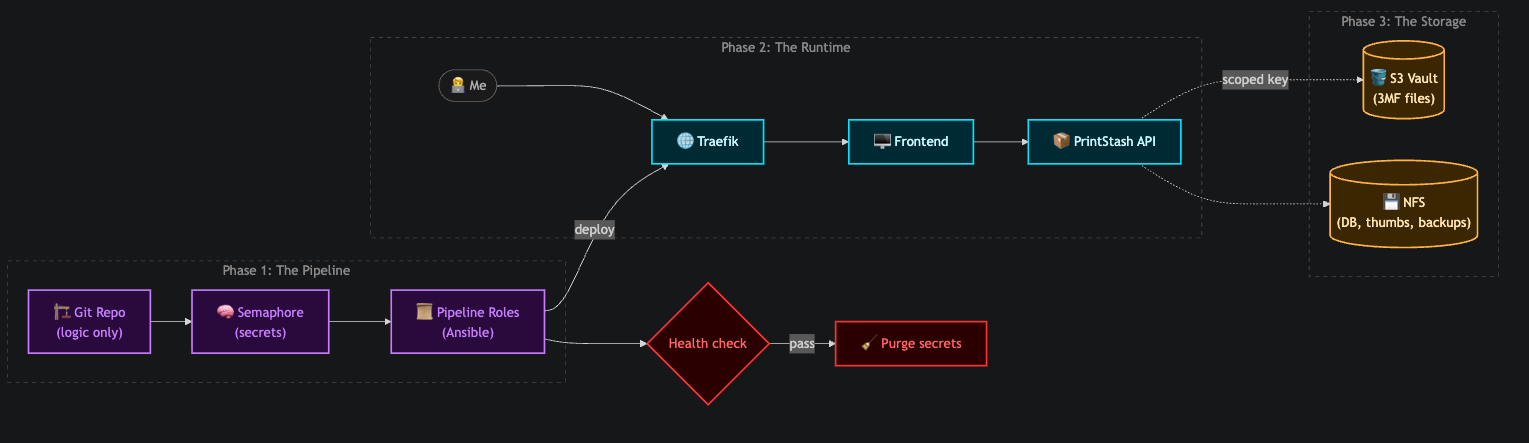
Phase 1 is where trust lives: Git carries logic, Semaphore carries secrets, and the shared roles do the work.
Phase 2 is the request path a person actually takes, from a browser through Traefik to the app.
Phase 3 is the split that matters for growth: big files go to object storage behind a bucket-scoped key, small stateful data stays on the NAS mount. The health check and purge at the bottom are what make the whole thing safe to re-run.
The Verdict: Mixed, and Honest About It
Here's my honest read. The infrastructure side is a clear win. A library that costs almost nothing to deploy, keeps its big files in durable object storage, holds zero secrets in Git, and never asks my network to loosen up is exactly the shape I want. That part I'd recommend without hesitation.
The feature that's already earned its place is a small one: PrintStash can open a file, whether it's an STL, a 3MF, or another supported format, directly in my slicer. There's no download step. I find the design in the library, open it, and I'm looking at it in the slicer. That sounds minor until you remember where this post started. The Downloads folder full of "final_v2" copies exists because getting a file into the slicer used to mean saving a copy somewhere first, and every saved copy is a new chance for the wrong version to survive. Skip the download and that whole class of stray copies never gets created. It's also the most direct answer to the order-to-file question I opened with: an order comes in, I find the product, and I'm in the slicer with the right file.
The other feature I'd point to is tags and favorite views. Tags let me label designs however makes sense to me, and a saved view turns a tag or a filter into a one-click shortcut. That solves a problem I hadn't put into words: the library has two audiences with opposite needs. I want the full archive, every revision and every experiment, because that history is the value. Anyone I eventually hand a print job to will want the opposite, the one right file with nothing else in the way. A view can give them a short, curated door into the same library, with the archive intact behind it. Nobody else is using it yet. The plan is to walk family or helpers through it when the time comes, and a view keeps that walkthrough short. I don't have to choose between a clean shelf for them and a complete record for myself, and I don't have to keep two copies of anything to get both.
The first-run friction is the mixed part. Setup takes a few non-obvious steps when you put the app behind a TLS proxy and an object store, and I hit all of them. And the shop workflows I listed earlier are what I'm using it for, not a finished result: views and tags are how I'm setting up the catalog and the handoff, but no one besides me has used them yet, and I'm still proving out versioned print profiles. It's still early, and I'd rather report that than oversell it.
The lesson is the same one the last few posts landed on, just applied to a print shop: the tool matters less than the boundaries around it. PrintStash doesn't need my printers, my LAN, or my secrets, so it doesn't get them. It gets a scoped bucket, a mount, and a pipeline that cleans up after itself. Everything else I can change later without touching the files that took real work to get right.
The Real Win: A Day, Not a Project
This is the part I opened with, proven out: the decision cost almost nothing. I went from "I wonder if this fits my workflow" to a real service running in production in a single day, and that has nothing to do with PrintStash being unusually easy. It's because the private cloud underneath it was designed well.
Ingress, TLS, DNS, shared storage, object storage, a secrets vault, and a deployment pipeline already existed, so trying a new tool meant writing a compose file and a small playbook, not building an environment. The pipeline handled the secrets. The proxy handled the certificate. The NAS and the object store were already there. When I wanted to test an idea I could pivot to it immediately, and when it earned its place, moving it into production was a config change, not a migration.
That's what good infrastructure buys you. It isn't uptime numbers or clever architecture diagrams. It's that the cost of saying "let's try it" drops to almost nothing, so you can afford to be curious. Bad ones make every experiment a project. Good ones make it an afternoon.
PrintStash may or may not be the tool I'm still using a year from now. Because of how the lab is built, I can find out for the price of a day, and swapping it out costs about the same.


